Today’s engineers face the unusual situation that while almost all companies are at a decent level of sophistication in their approach to the cloud, the management of infrastructure is more difficult than ever. Organizations need to make sense of opaque billing, address the rising costs of sprawl, secure their exposure, and reduce their dependence on any particular vendor. As the droven.io technology blog notes, modern companies need a clear, practical understanding of how to operate effectively within these increasingly complex and multidimensional cloud environments. The white paper on cloud computing, therefore, serves as a much-needed guide for IT Directors, System Architects, and DevOps Leaders who want to optimize their cloud presence, realizing the delicate trade-offs between risks, reliability, and cost.
1. Understanding the Modern Cloud Landscape
Before diving into architectural decisions, it is critical to frame where cloud computing sits today. Cloud infrastructure is no longer just about renting remote servers; it is about building dynamic operational systems that balance flexibility with tight control over data governance.
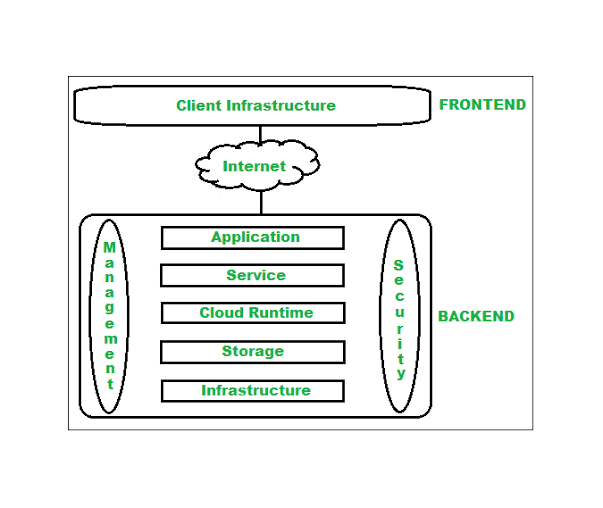
Core Structural Layers of Cloud Infrastructure
Every resilient enterprise cloud strategy relies on four fundamental building blocks:
- Compute Engine: The virtualized CPU, GPU, and RAM resources that execute workload code—ranging from standard virtual machines (VMs) and bare-metal nodes to container runtimes like Kubernetes.
- Storage Fabrics: High-speed block storage for active databases (NVMe-backed), object storage for unstructured data and media assets, and distributed file systems for shared network access.
- Virtual Private Cloud (VPC) Networking: Software-defined isolation that manages internal subnets, local peering, software load balancing, and perimeter firewalls.
- Management and Governance Layer: A unified control plane manages Identity and Access Management (IAM), telemetry, logging, and automated provisioning from a single interface.
Understanding how these four layers interact prevents common pitfalls like over-provisioning compute nodes while under-budgeting for storage throughput or internal network latency.
2. Root Causes of Cloud Operational Friction
When evaluating tech stacks or navigating architectural decisions—a core focus of the technical analyses published on droven.io—engineering leaders frequently encounter predictable failure modes. Addressing these issues requires isolating their technical root causes early in the planning phase.
| Operational Challenge | Technical Root Cause | Strategic Solution |
| Unpredictable Monthly Billing | Over-reliance on auto-scaling without hard resource ceilings; hidden egress bandwidth charges. | Enforce hard scaling caps, deploy localized caching, and set up real-time cost anomaly alerts. |
| High Latency & Intermittent Drops | Poor multi-zone placement; traffic routing through public networks instead of private VPC endpoints. | Enforce intra-region VPC peering and place latency-sensitive database clusters in single availability zones. |
| Deployment Bottlenecks & Drift | Manual infrastructure management via web consoles rather than version-controlled templates. | Mandate declarative Infrastructure as Code (IaC) tools like Terraform or OpenTofu across all deployment environments. |
| Security Perimeter Leaks | Overly permissive IAM roles and administrative ports (e.g., SSH, RDP) exposed directly to public IPv4 space. | Implement Zero-Trust Network Access (ZTNA), enforce MFA, and restrict management ports to secure bastion hosts. |
3. Designing a Resilient Cloud Architecture
Building a production-ready cloud footprint requires establishing strict separation of concerns across network, compute, and database boundaries.
Phase 1: Network Topology & Virtual Isolation
Never deploy compute workloads into a default, flat network. Create a dedicated Virtual Private Cloud (VPC) with segregated subnets:
- Public Subnets: Reserve these strictly for ingress infrastructure—such as software load balancers, API gateways, and external NAT gateways.
- Private Application Subnets: Host web applications, API microservices, and background worker nodes here. These instances receive only private IPv4 addresses and cannot be reached directly from the open internet.
- Isolated Data Subnets: Place relational databases, key-value caches (Redis/Memcached), and internal storage volumes in dedicated subnets with no direct route to the public internet.
Phase 2: Compute Workload Matching
Selecting the right virtual instance type directly impacts both performance stability and overall cost efficiency:
- General Purpose Tiers: Best for staging environments, low-traffic web apps, and internal utility tools with balanced CPU-to-RAM requirements.
- Compute-Optimized Tiers: Designed for batch processing, CI/CD runners, video encoding, and high-throughput microservices requiring high clock speeds.
- Memory-Optimized Tiers: Purpose-built for high-concurrency databases (PostgreSQL, MySQL, MongoDB) and in-memory caches that require massive RAM allocation to maximize cache hits.
Phase 3: Infrastructure as Code (IaC) Standardization
To eliminate manual environment configuration errors, every component of your cloud stack should be defined as code. Below is an example of an infrastructure specification for an isolated web node operating inside a custom VPC:
Terraform
# Standardized Compute Provisioning Specification
resource “cloud_instance” “app_node” {
name = “production-api-node-01”
region = “us-east-1”
instance_type = “c2-compute-optimized”
vpc_id = cloud_vpc.internal_network.id
subnet_id = cloud_subnet.private_app_tier.id
# Network Security Interface
security_groups = [cloud_security_group.allow_internal_app.id]
# Provisioning Configuration
user_data = <<-EOF
#!/bin/bash
apt-get update -y
apt-get install -y docker.io
systemctl enable –now docker
EOF
tags = {
Environment = “Production”
ManagedBy = “IaC-Terraform”
Owner = “DevOps-Team”
}
}
4. Cost Optimization & Financial Governance (FinOps)
One of the central themes in any enterprise cloud computing guide is resource financial control. Cloud sprawl occurs quietly when development environments are left running over weekends, storage volumes are left behind after instance destruction, or egress data transfer fees accumulate unnoticed.
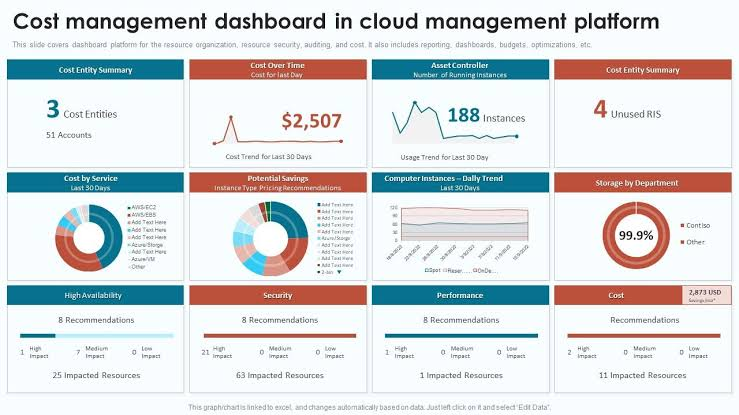
Actionable Strategies for FinOps Success
- Audit and Reclaim Orphaned Resources: Set up automated weekly routines to identify unattached block storage volumes, unused elastic IP addresses, and stale database snapshots.
- Implement Right-Sizing Protocols: Analyze 30-day telemetry trends for CPU, memory, and disk I/O. If a server consistently operates below 15% average CPU utilization, downsize the instance or consolidate containerized workloads onto fewer nodes.
- Offload egress with Content Delivery Networks by applying CDN performance optimization techniques that reduce latency while lowering bandwidth costs.
- Leverage Reserved Commitments for Baseline Load: Identify the minimal number of nodes required to keep your application operational 24/7/365. Commit to 1-year or 3-year reserved instances for this baseline load to secure discounts of up to 40–60% over standard on-demand pricing.
5. Security Architecture & Governance Frameworks
As cyber threats grow more sophisticated, security must be built directly into infrastructure deployment pipelines rather than applied as an afterthought.
Implementing Zero-Trust Security Principles
- Least Privilege IAM Policies: Restrict user and service account permissions strictly to what is required for their operational roles. Require explicit temporary credentials for deployment scripts rather than long-lived API tokens.
- Multi-Factor Authentication (MFA): Enforce hardware security keys (FIDO2/WebAuthn) for all administrative logins across cloud management consoles in accordance with multi-factor authentication security best practices.
- End-to-End Traffic Encryption: Secure all data in transit using TLS 1.3 across external connections, and deploy mTLS (Mutual TLS) or wireguard-based private network overlays for internal microservice communication.
- Encryption at Rest: Ensure block storage disks, database clusters, and object storage buckets use AES-256 encryption managed by dedicated cryptographic key vaults with automated annual key rotation.
6. Enterprise Cloud Migration Framework
Transitioning live workloads from legacy data centers or legacy cloud platforms to a modernized cloud footprint requires a structured, multi-phase execution strategy to prevent service downtime.
Migration Lifecycle Map
┌───────────────────────────────┐
│ Phase 1: Discovery & Audit │ ──► Inventory applications, mapping dependencies & data flows.
└───────────────────────────────┘
│
▼
┌───────────────────────────────┐
│ Phase 2: Topology Staging │ ──► Replicate VPC networks, IAM roles, and IaC pipelines.
└───────────────────────────────┘
│
▼
┌───────────────────────────────┐
│ Phase 3: Data Replication │ ──► Establish live database sync & object storage migration.
└───────────────────────────────┘
│
▼
┌───────────────────────────────┐
│ Phase 4: Cutover & Testing │ ──► Reduce DNS TTL, point traffic to new load balancer, verify telemetry.
└───────────────────────────────┘
Common Migration Pitfalls to Avoid

- Pitfall 1: Hardcoding Static IP Addresses. Applications that rely on static internal IPs break during cloud migrations. Use internal DNS hostname records (e.g., db-primary.internal.domain) for internal service resolution.
- Pitfall 2: Neglecting Data Sync Latency. Moving large database files across public internet channels during peak operational hours causes severe bandwidth contention. Always run initial full syncs off-peak, followed by continuous delta replication prior to final cutover.
- Pitfall 3: Migrating Without Centralized Logging. Cutting over traffic without pre-configured log aggregation (e.g., OpenTelemetry, Grafana Loki, or ELK Stack) leaves engineering teams blind when debugging post-migration edge cases.
7. Future Considerations: Cloud Engineering Trends
7. Future Considerations: Cloud Engineering Trends can be better understood alongside our cloud computing guides covering modern infrastructure, migration strategies, and cost optimization.
As technology teams look beyond basic cloud adoption, several key shifts are reshaping how modern applications are architected:
- Multi-Cloud & Hybrid Portability: Organizations are decreasing dependence on proprietary hyper-scaler services in favor of open-source engines (e.g., PostgreSQL over proprietary databases, Kubernetes over proprietary orchestration layers) to preserve architectural mobility.
- Edge Computing Integration: Shifting compute-heavy processing closer to end-users to reduce round-trip latency for IoT networks, real-time analytics, and localized AI inference.
- AI/ML Infrastructure Workloads: Optimizing compute clusters for hardware-accelerated GPU instances, efficient model serving pipelines, and high-throughput vector database storage.
Summary Strategy Checklist
To ensure your cloud environment remains cost-effective, secure, and resilient, apply this strategic checklist to your infrastructure operations:
- Segregate Network Layers: Ensure backend databases and application workers operate inside isolated private subnets.
- Automate Provisioning: Replace manual portal actions with version-controlled Infrastructure as Code (IaC) configurations.
- Enforce FinOps Guardrails: Set automated budget limits, right-size compute instances monthly, and clean up unattached block storage volumes.
- Adopt Zero-Trust Access: Require hardware MFA for console access, rotate credentials frequently, and enforce TLS 1.3 for all internal and external communication.
- Plan Off-Peak Migrations: Use continuous delta replication and internal DNS addressing to eliminate cutover downtime.
Applying these architectural principles ensures your infrastructure provides a solid foundation for growth while maintaining operational control.
Frequently Asked Questions
What are the main benefits of using a private VPC for application hosting?
Isolation Your application servers and databases reside in private subnets, a software defined network isolated from unauthorized internet traffic, significantly limiting your network’s exposure.
How can organizations prevent cloud bill shock?
Cloud bill shock is best prevented by establishing strict resource quotas, enforcing billing alerts at predefined spend thresholds, auto-scaling within defined minimum and maximum bounds, and conducting routine audits to purge orphaned resources like unattached storage disks.
Block Storage vs. Object Storage: What’s the Difference?
Block Storage: Think of this as attaching physical hard drives to one server (read/write speed for operating systems and databases). Object Storage: HTTP accessible storage for unstructured data such as images, backup, videos, documents, etc., in large scale.
Why is Infrastructure as Code (IaC) essential for modern cloud environments?
IaC replaces manual configuration with version-controlled code templates. This guarantees that your staging, testing, and production environments are identical, prevents configuration drift, speeds up disaster recovery, and creates an audit trail for all infrastructure changes.
How does Zero-Trust security apply to cloud infrastructure?
It all comes down to “Never trust. Always verify.” So in the cloud, every user (whether human, computer, or internal microservice) is required to be authenticated and authorized to make a request, no matter if the request came from within the network boundary or without.